Decoding the Oculus Controller: A Deep Dive into its Proprietary Protocol
Update: This post has been updated to correct some details regarding the radio channels and frequencies used during the advertisement and pairing processes.
So I was messing around with my Oculus controllers the other day and got curious - how the hell do these things actually talk to the headset? While it might seem like magic, it’s all managed by a sophisticated, proprietary radio protocol. It’s not your standard Bluetooth LE; instead, it’s a custom solution built on top of a Nordic Semiconductor chipset, running in a proprietary 2Mbit/s mode.
I spent way too much time digging through firmware dumps and packet captures to figure this out, so here’s what I found. I’ll walk you through the physical layer, how devices find each other, the pairing process, and this command system I call SPL.
Please note that all information presented here is the result of independent research and may contain mistakes or inconsistencies.
The Physical Layer: Not Your Average Bluetooth
The whole thing is built on this custom radio setup. They basically said ‘screw standard Bluetooth’ and rolled their own thing for better speed.
- Data Rate: A speedy 2 Mbit/s.
- Channels: Advertisement packets are sent on Channel 37 (2402 MHz), while the pairing process and subsequent main communication use Channel 38 (2426 MHz).
- Packet Whitening: Disabled.
- CRC-24: A 3-byte CRC with an initial value of
0x00FFFFFFand polynomial0x00108421ensures data integrity.
The packet structure itself is defined with a 1-byte preamble, a 5-byte access address, an 8-bit length field, the PDU payload (up to 255 bytes), and the 3-byte CRC.
Finding the Controller: Advertisement and Discovery
To connect, a controller first needs to announce its presence. This is triggered by pressing HOME + Y on the left controller or HOME + B on the right one. For about 60 seconds, the controller enters advertisement mode, broadcasting its availability every 100ms.
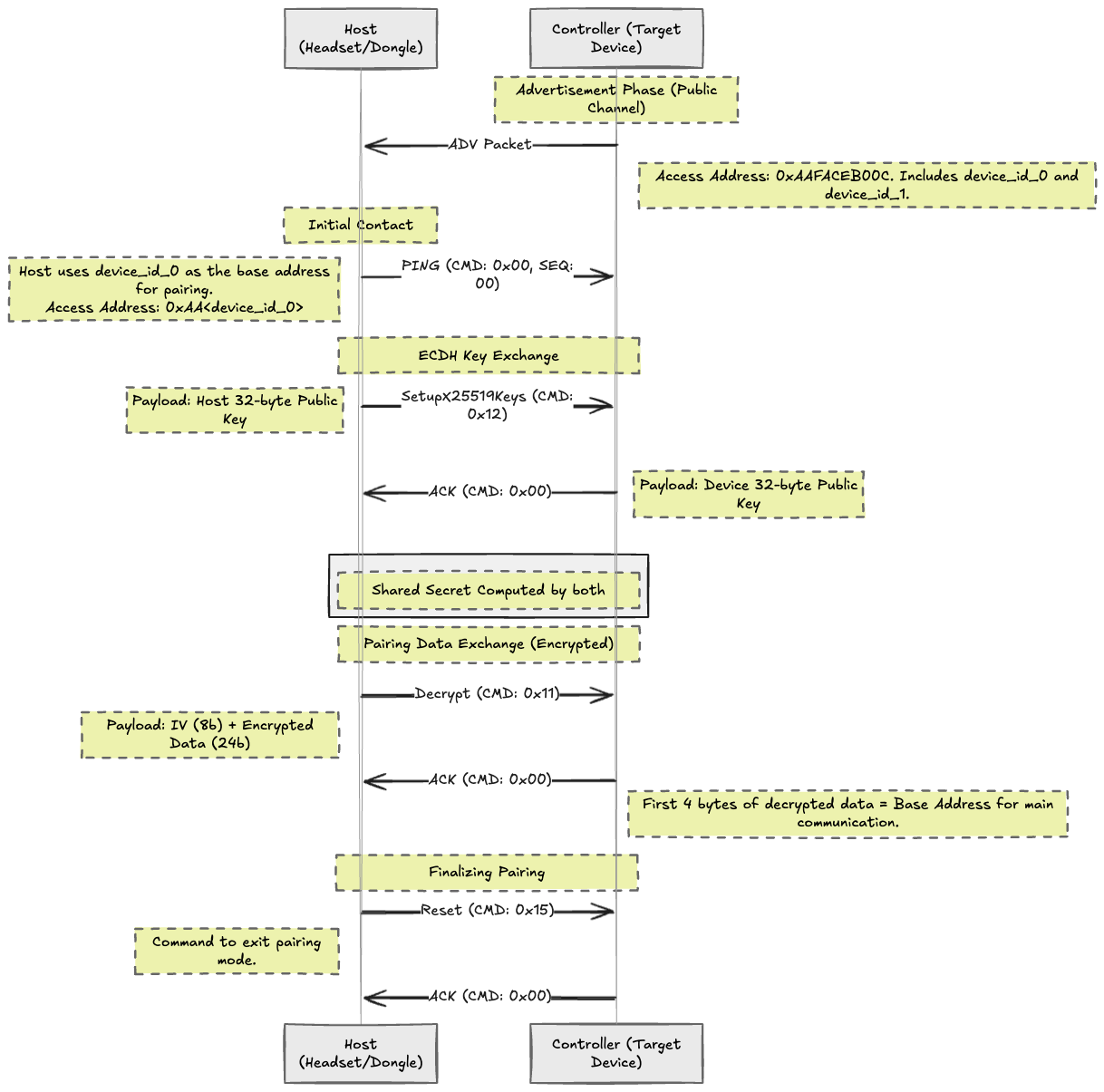
The host (headset or dongle) scans Channel 37 (2402 MHz) for a very specific 5-byte Access Address: 0xAA + 0xFACEB00C. The FACEB00C part is hilarious - some dev definitely had fun with that one. When the host’s radio, which is configured to filter for this exact address, finds a matching packet, it knows an Oculus controller is nearby and ready to connect.
The advertisement packet payload contains crucial information:
controller_type: Identifies it as a Left (0x01) or Right (0x02) controller.device_id_0/device_id_1: A unique ID for the controller. The first part is particularly important as it becomes the base address for the subsequent pairing process.status: A bitmask that reveals the controller’s state, such as whether theHOME + Y/Bcombo is pressed, if the firmware is corrupted, or if it’s in a special SPL (bootloader) mode.
The Handshake: Secure Pairing Process
Once a controller is discovered, the host initiates the pairing process. This involves a Diffie-Hellman key exchange (specifically, Curve25519) to establish a secure, encrypted link.
The flow is a standard command-response pattern, with the host always initiating:
Initial Contact: The host switches to Channel 38 (2426 MHz) and starts pinging the controller using the
device_id_0from the advertisement packet as the new base access address.- ECDH Key Exchange:
- The host sends its 32-byte public key using the
SetupX25519Keyscommand (CMD ID: 0x12). - The controller responds with an ACK containing its own 32-byte public key.
- Now, both sides can compute a shared secret. This secret is used only to encrypt the next step.
- The host sends its 32-byte public key using the
- Main Communication Key Exchange:
- The host sends the main communication link key, encrypted with the shared secret, using the
PairingDatacommand (CMD ID: 0x11). - The controller decrypts this payload. The first 4 bytes of the decrypted data become the new base address for the main, ongoing communication link.
- The host sends the main communication link key, encrypted with the shared secret, using the
- Finalizing the Connection:
- The host sends a
Resetcommand (CMD ID: 0x15), telling the controller to exit pairing mode. - The device sends a final ACK and switches to normal operation, now on a secure and established channel.
- The host sends a
Pairing Flow
Speaking the Language: The Oculus SPL Command Protocol
It’s important to note that the SPL protocol isn’t the primary protocol used for transmitting real-time controller data like button presses and joystick movements during gameplay. Instead, think of SPL as a device management or bootloader protocol. It’s used for critical, low-level operations such as the initial pairing, firmware updates, and security procedures. The main application-level communication protocol is significantly more complex and will be the subject of a future deep dive. For now, let’s explore the commands that manage the controller’s core functions.
For more complex operations like firmware updates, security handshakes, or diagnostics, the devices use the Oculus SPL (Serial Protocol Layer). SPL packets have a simple structure: a length byte, a command byte, a sequence number, a payload, and a CRC.
The cmd byte is a bitmask that indicates if it’s an error, the actual command ID, and whether a response payload is expected.
Firmware analysis has revealed a rich set of commands, including:
GetSN(0x03): Retrieves the device’s 16-byte serial number.SetupX25519Keys(0x12): Used in the pairing process to exchange public keys.WriteAESKey(0x14): Writes a persistent 128-bit AES key to the device’s storage.Reset(0x15): Restarts the controller.WriteAppImage(0x22): Writes a chunk of a firmware image to flash, used for Over-the-Air (OTA) updates.GetAppVersion(0x24): Gets the version of the running application firmware.GetBatteryStatus(0x2F): Retrieves the battery level and voltage.IsDeviceUnlocked(0x3D): Checks if the device’s bootloader is unlocked.GetLockMagic(0x3E): Retrieves a challenge value related to the device’s lock state, likely used in the official unlocking procedure.
Detailed SPL Command Reference
Here is a more detailed breakdown of the known SPL commands identified from firmware analysis.
0x03 GetSN
Retrieves the 16-byte ASCII device serial number.
Response Payload
| Field | Size (bytes) | Description |
|---|---|---|
sn | 16 | 16-byte ASCII string |
0x0F UpdateCaptouchVersion
Used to update the Captouch firmware version and reboot the controller.
Request Payload
| Field | Size (bytes) | Description |
|---|---|---|
MAJ | 1 | Major version |
MIN | 1 | Minor version |
REV | 1 | Revision |
0x10 GetCaptouchStatus
Retrieves the status and version of the Captouch firmware.
Response Payload
| Field | Size (bytes) | Description |
|---|---|---|
MAJ | 1 | Major version |
MIN | 1 | Minor version |
REV0 | 1 | Revision 0 |
REV1 | 1 | Revision 1 |
REV2 | 1 | Revision 2 |
need_update | 1 | Flag indicating if an update is needed. |
0x11 PairingData
Used by the host to send encrypted pairing data during the pairing process.
Request Payload
| Field | Size (bytes) | Description |
|---|---|---|
iv | 8 | Initialization Vector (IV). |
data | 24 | Encrypted data. |
0x12 SetupX25519Keys
Exchanges public keys to establish a shared secret via ECDH.
Request Payload (Host -> Controller)
| Field | Size (bytes) | Description |
|---|---|---|
pub_key | 32 | 32-byte of a host public key |
Response Payload (Controller -> Host)
| Field | Size (bytes) | Description |
|---|---|---|
pub_key | 32 | 32-byte of a controller public key |
0x14 WriteAESKey
Writes a persistent 128-bit AES key to the device.
Request Payload
| Field | Size (bytes) | Description |
|---|---|---|
key_meta | 4 | Unknown metadata associated with the key. |
key | 16 | 128-bit AES key. |
0x15 Reset
Restarts the controller, typically used to exit pairing mode. This command has no payload.
0x16 ResetDMMode
Restarts the controller into a Device Managment mode. This command has no payload.
0x21 WipeImage
Wipes a firmware image from the device’s flash memory. The specific image is determined by img_id.
- If
img_id< 3, the Application (APP) image is wiped. - If
img_id== 3, the an ATtiny co-processor image is wiped.
Request Payload
| Field | Size (bytes) | Description |
|---|---|---|
img_id | 1 | Identifier of the image to be wiped. |
0x22 / 0x23 WriteAppImage / WriteAppImageWithCheck
Writes a chunk of data to the application firmware image area.
Request Payload
| Field | Size (bytes) | Description |
|---|---|---|
offset | 4 | Offset within the image to write to. |
length | 1 | Length of the data chunk (N). |
data | length | The firmware data chunk. |
0x24 / 0x25 GetAppVersion / GetSplVersion
Retrieves version information for the application or SPL firmware.
Response Payload
| Field | Size (bytes) | Description |
|---|---|---|
major | 1 | Major version number. |
minor | 1 | Minor version number. |
rev | 1 | Revision number. |
sub_rev | 1 | Sub-revision number. |
name | 13 | Null-terminated firmware name string. |
0x2F GetBatteryStatus
Retrieves battery status information.
Response Payload
| Field | Size (bytes) | Description |
|---|---|---|
percentage | 4 | Battery charge percentage (unsigned int). |
volts | 5 | Battery voltage information. |
0x3B UploadUnlockTokenString
Uploads a chunk of the device unlock token, which is a 169-byte string.
Request Payload
| Field | Size (bytes) | Description |
|---|---|---|
offset | 1 | Offset of the chunk within the token. |
data | SIZE | The token data chunk. |
The SIZE of the data chunk is calculated as follows:
- If
offset + 31 < 169, thenSIZEis 31. - If
offset + 31 >= 169, thenSIZEis169 - offset - 1. - An error occurs if
offset >= 169.
0x3C ConvertUnlockTokenToBinary
Processes the uploaded unlock token string and converts it to its binary representation.
Request Payload
| Field | Size (bytes) | Description |
|---|---|---|
flag | 1 | A flag influencing the conversion process. |
0x3D IsDeviceUnlocked
Retrieves the device’s lock status.
Response Payload
| Field | Size (bytes) | Description |
|---|---|---|
status | 1 | Lock status (1 if unlocked, 0 if locked). |
0x3E GetLockMagic
Retrieves a magic number or challenge related to the device’s lock state, possibly for use in an unlock procedure.
Response Payload
| Field | Size (bytes) | Description |
|---|---|---|
magic | 4 | Lock magic |
Conclusion
This post covered the proprietary radio protocol used by Oculus controllers for device management. We’ve detailed the physical layer, the advertisement and pairing process, and the command-based SPL protocol used for firmware updates and security operations.
As noted, the SPL protocol is just one piece of the puzzle. The more complex application-level protocol, which handles real-time user input, is a separate system. A future post will explore that protocol as well.
Anyway, this was a fun rabbit hole to go down.